17. Input Handlers
When running a Command (from whatever source), sometimes it is necessary to gather some information directly from the user instead of relying on a fixed set of arguments for the value of every argument (e.g. from a Key Binding). When this need arises, Input Handlers and the Input-Handler subsystem are the tools to get it done.
17.1. Overview
If you studied Commands, you already know that a command can receive as many
additional arguments (beyond self and edit) as its author needs it to.
Here is an example of a command with 2 additional arguments:
class ExampleCommand(sublime_plugin.TextCommand):
    def run(self, edit, message, insert_point):
        # do something here
If the “runner” of that command (say a key binding, a menu, or a Plugin) supplies all
those arguments, then the call of the Command’s run() method occurs flawlessly.
However, if any of those arguments are omitted like this:
args = {"message": "Hello world!"}
self.view.run_command("example", args)
then a TypeError exception is raised:
TypeError: ExampleCommand.run() missing 1 required positional argument: 'insert_point'
17.1.1. Enter Input Handlers
(or “The Subsystem that Prompts for Missing Arguments”)
As it turns out, the above (running a command with missing arguments) is the trigger that initiates the Input-Handler subsystem. All you need to make it work is:
redefine a few methods from the inherited
sublime_plugin.Commandparent class, andprovide an object instantiated from one of the
...InputHandlerclasses (usually a subclass you create) for each argument that may need prompting for, which provides the Input-Handler subsystem with the information it needs to guide the user thorough inputting a valid value for each argument.
Note
Raising your own TypeError exception does not initiate the
Input-Handler subsystem.
17.1.2. Requirements
Important!
Input Handlers only work for Commands that are available in the Command Palette.
Therefore, to use them with any Command you create, you must also create that Command
in a .sublime-commands file to get the command into the Command Palette, even
though your Command may be invoked from a source other than the Command Palette.
For purposes of illustration, let us imagine a set of 5 additional arguments required to run a Command. Let us say that you are sharing this Command with others (e.g. in a Package) and want to allow its users to be able to omit any combination of arguments and have the user prompted for whatever arguments are missing.
Keep in mind that the subsystem allows the end user, at any point in the sequence, to:
proceed forward (by hitting Enter),
go backwards (by hitting Backspace), or
cancel the sequence (by hitting Esc).
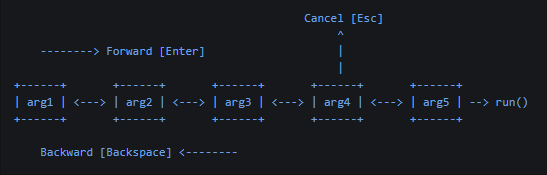
Fig. 17.1.2.1 Input Handler Flow in the User Interface
The subsystem must be provided with the “knowledge” needed to be able to:
Decide which argument to prompt for first.
Proceed forward after receiving an Enter keypress after each prompt.
For each missing argument, prompt the user with:
optional description,
optional placeholder text,
the list of valid values when the user is expected to select from a list,
optional initial text,
how the value is represented after it is entered,
an optional preview (text or HTML) while the user is editing its value.
Provide optional validation and/or confirmation for each value received.
Optionally provide the modifier keys that were being held down when the Enter key was pressed to proceed in the input sequence. (Can be useful to modify Input-Handler behavior, or to do something special with the value.)
Optionally notify your Plugin or Package if the user cancels the prompt sequence.
17.1.3. Making it Work
To make it work, you need to:
Define an
...InputHandlersub-class for each argument whose value may need to be prompted for. Redefine methods in each class to give it features (e.g. description, placeholder text, default value, preview, validation and/or confirmation). Redefine itsnext_input(self, args)method when there may be subsequent values to prompt for (returns the...InputHandlerobject for the next missing argument, if any). Ifnext_input(self, args)returnsNone, but there are still missing arguments, the Input-Handler subsystem will go back to the Command’sinput(self, args)method to try to get a...InputHandlerobject to help prompt for the missing argument.In your Command, redefine the
input(self, args)method (from its inherited version) to determine the FIRST missing argument to prompt for (returns the...InputHandlerobject for the first missing argument).
17.1.4. Flow of Control
Both Command and ...InputHandler classes have the internal method
create_input_handler_(self, args) which is called by Sublime Text
internally whenever a set of arguments in hand to run a Command has missing required
arguments. Both methods are expected to return an object instantiated from a
subclass of TextInputHandler or ListInputHandler for the next missing
argument, or None when all required arguments are now accounted for. That
...InputHandler object then provides (via its methods) the information needed to:
prompt for (and accept) the needed value, and
determine the next missing argument to prompt for, if any.
There is a subtle difference between the two versions of the
create_input_handler_(self, args) methods:
the
Commandclass’ version callsself.input(args), whereasthe
...InputHandlerclass’ version callsself.next_input(args).
Technically, they both could have been called next_input(args) because that is
what they are expected to provide. But as long as you understand that accurately,
then you will understand how to correctly define both Command.input() and
..InputHandler.next_input() methods. (The difference between them being that
the next_input() method need only check for arguments missing after its point
in the prompt sequence, though nothing prevents you from checking all of them.)
In this way, the Command plus the set of ...InputHandler classes provide an
event-driven forward-direction “daisy chain” that gathers information from the end
user needed to populate the arguments for a Command.
Navigating in the reverse direction is managed internally by Sublime Text by
maintaining a stack of ...InputHandler objects that have been used thus far.
Specifically, navigating backwards pops the top ...InputHandler object off that
stack.
Note
While nothing prevents you from having a next_input() method sending the
subsystem to an earlier point in the sequence, this author cannot think of a
good reason to do so, since it would (in most cases) confuse the end user,
and might confuse the Input-Handler subsystem as well, since it is maintaining
a stack of previously-used ...InputHandler objects.
Note
Unfortunately, modifying args dictionary (e.g. to add missing arguments,
e.g. when their values might be known from other arguments present) does not
work because the args dictionary received is only a copy of the the
dictionary the Input-Handler subsystem is using, rather than a reference to the
actual args dictionary being used. This information is current as of
build 4205.
17.2. Defining Your ...InputHandler Classes
For each argument that may need to be supplied by the end user, create a class that
inherits from either TextInputHandler or ListInputHandler.
17.2.1. ...InputHandler Inheritance Hierarchy
All of these are defined in `sublime_plugin.py` API file.

                  CommandInputHandler
          -----------------------------------
             /             |             \
            /              |              \
TextInputHandler    ListInputHandler    BackInputHandler
----------------    ----------------    ----------------
       ^               ^                          ^
       |               |                          |
       |               |                          |
  Sub-class from one of these two.      Instantiate directly
                                           from this one.
Note: that you never sub-class from BackInputHandler. You simply instantiate
from it when needed to provide the return value from next_input(self, args).
(This can be useful when the user is selecting from a list of values and one of the
list items is “Go Back” or something similar.)
17.2.2. TextInputHandler
Sub-class from sublime_plugin.TextInputHandler to create an Input Handler that
will gather input from the user in a free-form typing format, on one line of text.
These can also have an output-display area. A default value can be provided if
desired, and there is a convenient method you can use to validate input. You can
find an example of this in arithmetic.py that ships with Sublime Text.
Common methods to define for text input include:
initial_text(self)(optional)placeholder(self)(optional)next_input(self, args)(optional)
See below for details.
17.2.3. ListInputHandler
Sub-class from sublime_plugin.ListInputHandlers to create an Input Handler that
functions similar to a drop-down list, allowing the user to select from a number of
options. “Fuzzy searching” in the list is provided automatically similar to how
the Command Palette functions. A default selection can be provided if
desired.
Common methods to define for list input include:
list_items(self)(required)next_input(self, args)(optional)
See below for details.
17.2.4. Defining the Target Argument Name
You can redefine the inherited name(self) method to return the name of the target
argument, or you can do it the easy way, by naming the class such that the inherited
name(self) method will use the beginning of the class name to define the name
of the target argument. If you choose to do this, the normal approach is to prefix
the class name with the camel-case version of the argument to be supplied to the
Command. Example:
class TargetArgNameInputHandler(sublime_plugin.TextInputHandler):
      ^^^^^^^^^^^^^
targets the argument name “target_arg_name”. Specifically, the default implementation
of the name(self) method:
converts the class name to “snake case” (in the same way that does:
TargetArgNameInputHandler=>target_arg_name_input_handler,removes trailing “_input_handler” if present, and
returns the result.
Examples:
Class Name |
Target Argument |
|---|---|
MessageInputHandler |
message |
InsertPointInputHandler |
insert_point |
AlphaBRAvoCharlieInputHandler |
alpha_bRAvo_charlie |
Note: ‘_’ characters are inserted only before each transition from lower-case to upper-case, and nowhere else.
17.2.5. Redefine These Methods to Add Features
While a subclass of TextInputHandler can survive on its own without redefining any
methods (it causes the Input-Handler subsystem to present a plain input text-entry
box with no hints about what to type), subclasses of the ListInputHandler are
required to redefine their list_items(self) method to be useful.
Redefine the following methods (inherited from CommandInputHandler) to add the
features described below to the user experience.
next_input(self, args) -> CommandInputHandler | None(optional) Return the next...InputHandlerafter the user has completed this one. May returnNoneto indicate no more input is required, orsublime_plugin.BackInputHandler()to indicate that the Input-Handler subsystem should go backwards by one value. Default:None. (i.e. current...InputHandlerwill be popped off the stack)placeholder(self) -> str(optional) Placeholder text shown in the text-entry box when it is empty. Default: empty string.initial_text(self) -> str(optional) Initial text shown in the text-entry box. Default: empty string. This method can also be redefined forListInputHandlerclasses to provide an initial search/filtering string for the provided list.initial_selection(self) -> list[tuple[int, int]](optional) A list of 2-element tuples (each similar to a Region), defining the initially selected parts of the initial text. In this case, the “Region” refers to the string returned byinitial_text(self), not the contents of the current document’s Buffer. This can be useful to, for example, cause the entire initial text to be selected so that the first printable keystroke the user types replaces it. Default:[](empty list). Example:# Select all initial text. return [ (0, len(initial_text_str)) ]
preview(self, text: str) -> str | sublime.Html(optional) Called each time the contents of the text-entry box changes. The returned value (either plain text or HTML) will be shown in the preview area of the Command Palette. Default: empty string. Example:return sublime.Html(f'<strong>Value:</strong> [<em>{text}</em>]')
want_event(self) -> bool(optional) Whether thevalidate()andconfirm()methods should received a secondeventparameter (which carries the modifier keys that were being held down when theEnterkey was pressed to proceed in the input sequence.). Default:False. Example:# plain [enter] results in `event` containing: {'modifier_keys': {}} # [ctrl+enter] results in `event` containing: {'modifier_keys': {'ctrl': True, 'primary': True}} # [shift+ctrl+alt+enter] results in `event` containing: {'modifier_keys': {'alt': True, 'ctrl': True, 'primary': True, 'shift': True}} # [super+shift+ctrl+alt+enter] results in `event` containing: {'modifier_keys': {'alt': True, 'ctrl': True, 'primary': True, 'shift': True, 'super': True}}
validate(self, text: str, event: Event | None = None) -> bool(optional) Called whenever the user presses enter in the text entry box. ReturnFalseto disallow forward progress using the current value. What the user sees: when he presses the Enter key, progress forward does not happen. Default:True.If the user may need additional information to know how to proceed, you can provide it through any of these calls:
sublime.error_message(msg)
sublime.message_dialog(msg)
sublime.status_message(msg)
If you need an OK/CANCEL, or YES/NO/CANCEL response from the user, then either of these two calls can be made (respectively):
sublime.ok_cancel_dialog(msg, ok_button_name, title) -> bool
sublime.yes_no_cancel_dialog(msg, yes_button_name, no_button_name, title) -> DialogResult (
DialogResult== CANCEL: 0, YES: 1, NO: 2), which can also be represented assublime.DialogResult.CANCEL,sublime.DialogResult.YESandsublime.DialogResult.NOrespectively. (A Cancel button would probably imply cancelling the input sequence, which cannot be done from within this method. However, it could make sense to use that response to returnsublime_plugin.BackInputHandler()to cause the input sequence to return to the prior input value.)
- param event:
Only passed when
want_eventreturnsTrue; carries modifier keys being held when theEnterkey was pressed to proceed in the input sequence, as shown above.
confirm(self, text: str, event: Event | None = None)(optional) Called when the input is accepted, after the user has pressed enter and the text has been validated. No return value is expected (nor does returning a value have any effect), but a call tosublime.message_dialog(msg)can be made. Unfortunately, there is no way to stop the Input-Handler subsystem from proceeding from this method (as implied by its name), so if you wanted to allow the user a way to stop forward progress after a warning, that would have to be done from thevalidate()method, which can returnFalseto block forward progress.- param event:
Only passed when
want_eventreturnsTrue; carries modifier keys being held when theEnterkey was pressed to proceed in the input sequence, as shown above.
cancel(self)(optional) Called when the input handler is cancelled, either by the user pressing Backspace or Esc. This might be useful to clean up resources that may have been allocated when the Input-Handler sequence was begun, or to announce in the user interface (and/or in a log) that the sequence was cancelled and/or its consequences (e.g. in a message dialog or Status Bar message).
17.2.5.1. Specific to TextInputHandler
description(self, text: str) -> str(optional, inherited fromTextInputHandler) The text to show in the Command Palette when this input handler is not currently the one being processed (i.e. is not at the top of the...InputHandlerstack, to show the history of values accepted). Default: the text value the user entered.
17.2.5.2. Specific to ListInputHandler
description(self, value: Value, text: str) -> str:(optional, inherited fromListInputHandler) The text to show in the Command Palette when this input handler is not currently the one being processed (i.e. not at the top of the...InputHandlerstack, to show the history of values accepted). Default: the text of the list item the user selected. See below to understand what thevalueparameter contains.list_items(self) -> ...(required, inherited fromListInputHandler) This method should return the items to show in the list.The returned value may be a
listof items or a 2-elementtuplecontaining a list of items and anintindex of the item to pre-select.The each list item may be one of:
a string used for both the item’s display text and the value passed to the command;
a 2-element tuple containing a string for the row text, and a
Valueto pass to the command; ora
sublime.ListInputItemobject.
17.2.6. The Forward-Direction Daisy Chain
Both the Command.input(self, args) and
CommandInputHandler.next_input(self, args) methods return
the ...InputHandler object that represents the next argument requiring user input.
So each must be able to examine its args argument for missing dictionary
entries (whose keys are the argument names) in the same sequence you want the user
prompted for them, and instantiate the ...InputHandler class indicated. Unless
your Input-Handler sequence is private to your own installation, to be thorough,
create an ...InputHandler class for each argument that the user may not want to
hard-code (e.g. in a Key Binding) but instead get it provided by the user
when the command is run.
Example Implementation:
def input(self, args):
    result = None

    if 'message' not in args:
        result = MessageInputHandler()
    elif 'insert_point' not in args:
        result = PositionInputHandler()
    elif 'after_text' not in args:
        result = AfterTextInputHandler()

    return result
In a case where there is a list of optional arguments, but at least one must be provided, then you can adjust the logic accordingly: the user would need to select which one he wants to provide followed by the prompt for that value.
Each time the ...InputHandler.next_input(self, args) method returns an
...InputHandler object, Sublime Text next makes the Input Overlay
visible. If the Command has an input_description(method) method, it will be
called to get the string to use as the prompt to the left of the cursor while the
input sequence is in progress.
Each time the user submits his input (by hitting Enter), Sublime Text
tries again to call the command. If required arguments are still missing, it
attempts to call the next_input(self, args) method of the most-recently-used
...InputHandler object. That method can return one of the following:
an instance of the
...InputHandlerclass you created for your Command, that will gather the next input argument needed in theargsdictionary for your Command;an instance of
BackInputHandlerto cause the input sequence to “go back” to the previous state (e.g. previous...InputHandler); orNonewhich signals the Input-Handler subsystem that the last argument entry for theargsdictionary has been populated and to go ahead and run the Command passing theargsdictionary as it is. (ReturningNonecan also be done by letting the method run past its end with noreturnstatement.)
Note
If next_input(self, args) returns None, but there are still missing
arguments, the Input-Handler subsystem will go back to the Command’s
input(self, args) method to try to get a ...InputHandler object to help
prompt for the missing argument.
17.3. Note About next_input(self, args)
Nothing in the Input-Handler subsystem requires there to be a different
...InputHandler class for each argument that might need to be prompted for.
However, if you use the same class for more more than one argument, your
name(self) method would need to be defined to know to return a different name for
different arguments it was being used for. One way to do this would be to pass the
argument name at instantiation time to a custom __init__(self) method.
17.4. Example
To see this running in a simple, running example, use the code below. Also add
command odat_nurd_example0910 to a test Key Binding with different
arguments missing to see how Sublime Text uses these things. Comments are added to
overridden methods below to explain what they are for and when to override/redefine
them.
Put this in any-named .sublime-commands file anywhere in your User Package,
e.g. odatnurd-p101-09-example.sublime-commands.
[
    {
        "caption": "OdatNurd Example 09+10 Command",
        "command": "odat_nurd_example0910",
        "args": {
            // "message": "My message.",
            // "position": 0,
            // "after_text": "My additional statement."
        }
    }
]
Put the following in any-named .py file in the root of your User Package,
e.g. odatnurd-p101-09+10-example.py.
import sublime
import sublime_plugin
import pprint


class MessageInputHandler(sublime_plugin.TextInputHandler):
    def name(self):
        """
        Name of argument this Input Handler fills.

        The default definition for this method converts the name of the class
        (e.g. "MessageInputHandler") into just "message". When overridden,
        this Input Handler can provide a different name if desired.
        """
        return 'message'

    def initial_text(self):
        """
        Initial text shown in the text entry box. Empty by default.
        """
        return "Hello, world!"

    def initial_selection(self) -> [(int, int)]:
        """
        A list of 2-element Region tuples, defining the initially
        selected parts of the initial text.
        """
        return []

    def placeholder(self):
        """
        This placeholder text is shown in the background of the text entry
        box (grayed out) whenever it is empty.  Empty by default.
        """
        return 'Enter message to insert (not "Hello")'

    def description(self, text):
        """
        The text to show in the *Command Palette* when this input handler is not
        at the top of the input handler stack.  Defaults to the text the user
        entered.
        """
        return '<msg>'

    def preview(self, text):
        """
        Called whenever the user changes the text in the entry box. The returned
        value (either plain text or HTML) will be shown in the preview area of
        the *Command Palette*.
        """
        # return f'Inserting: [{text}]'
        return sublime.Html(f'<strong>Inserting:</strong> <em>{text}</em>')

    def validate(self, text, event):
        """
        Called when user hits [Enter] to submit input.  If this method returns
        `False`, nothing happens.  If it returns `True`, the input sequence proceeds.
        Default implementation returns `True`.

        :param event:  Gets passed when `want_event` returns `True`.  User hitting
                       plain [enter] results in `event` containing
                         `{'modifier_keys': {}}`.
                       [ctrl+enter] results in `event` containing
                         `{'modifier_keys': {'ctrl': True, 'primary': True}}`.
                       [shift+ctrl+alt] results in `event` containing
                         `{'modifier_keys': {'alt': True, 'ctrl': True, 'primary': True, 'shift': True}}`
        """
        print('validate() running...  Event object shown below.')
        pprint.pp(event, indent=4)
        result = True

        if text == 'Hello':
            result = False

        return result

    def cancel(self):
        """
        Called as an "event hook" if/when user cancels input sequence with [Esc]
        or [Backspace] to go back.
        """
        print('User cancelled at MessageInputHandler.')

    def confirm(self, text, event):
        """
        Called when the input is accepted, after the user has pressed enter and
        the text has been validated.

        :param event:  Gets passed when `want_event` returns `True`.  User hitting
                       plain [enter] results in `event` containing
                         `{'modifier_keys': {}}`.
                       [ctrl+enter] results in `event` containing
                         `{'modifier_keys': {'ctrl': True, 'primary': True}}`.
                       [shift+ctrl+alt] results in `event` containing
                         `{'modifier_keys': {'alt': True, 'ctrl': True, 'primary': True, 'shift': True}}`
        """
        print(f'Message.confirm():  Got [{text}].  Event object below.')
        pprint.pp(event, indent=4)

    def want_event(self) -> bool:
        """
        Whether the `validate()` and `confirm()` methods should received a
        second `Event`-type parameter.  Returns `False` by default.
        """
        return True

    def next_input(self, args):
        if 'position' not in args:
            return PositionInputHandler()


class PositionInputHandler(sublime_plugin.ListInputHandler):
    def list_items(self):
        # Option 1:  a list of strings to choose from; good for text options.
        # return ['0', '50', '-1', '-100']
        #
        # Option 2:  a list of tuples, the user sees the first element, the
        #            second element is the value.
        # return [
        #     ('Top of the file', 0),
        #     ('Middle of the file', 50),
        #     ('Bottom of the file', -1),
        #     ('Cancel', -100)
        # ]

        # Option 3:  a tuple that contains a list as in option 2, and also
        #            the index of the item that should be selected by default.
        return (
                [
                    ('Top of the file', 0),
                    ('Middle of the file', 50),
                    ('Bottom of the file', -1),
                    ('Cancel', -100)
                ],
                2
            )

    def description(self, value, text: str) -> str:
        """
        The text to show in the *Command Palette* when this input handler is not
        at the top of the input handler stack. Defaults to the text of the list
        item the user selected.
        """
        return f'Value [{value}]'

    def preview(self, value):
        """
        Called whenever the user changes the text in the entry box. The returned
        value (either plain text or HTML) will be shown in the preview area of
        the *Command Palette*.
        """
        #return f'Inserting at position: [{value}]'
        return sublime.Html(f'<strong>Inserting at position:</strong> <em>{value}</em>')

    def initial_text(self):
        """
        Initial text as if user typed this in.  Will cause "fuzzy filtering"
        to be applied to the list.
        """
        return ''

    def cancel(self):
        """
        Called as an "event hook" if/when user cancels input sequence with [Esc]
        or [Backspace] to go back.
        """
        print('User cancelled at PositionInputHandler.')

    def confirm(self, value):
        """
        Called when the input is accepted, after the user has pressed enter and
        the text has been validated.

        :param event:  Gets passed when `want_event` returns `True`.  User hitting
                       plain [enter] results in `event` containing
                         `{'modifier_keys': {}}`.
                       [ctrl+enter] results in `event` containing
                         `{'modifier_keys': {'ctrl': True, 'primary': True}}`.
                       [shift+ctrl+alt] results in `event` containing
                         `{'modifier_keys': {'alt': True, 'ctrl': True, 'primary': True, 'shift': True}}`
        """
        print(f'Position.confirm():  Got [{value}].  Event object below.')
        self.selected_value = value

    def next_input(self, args):
        if self.selected_value == -100:
            return sublime_plugin.BackInputHandler()
        elif 'after_text' not in args:
            return AfterTextInputHandler()


class AfterTextInputHandler(sublime_plugin.TextInputHandler):
    def placeholder(self):
        """
        This placeholder text is shown in the background of the text entry
        box (grayed out) whenever it is empty.  Empty by default.
        """
        return 'Any additional text you want to add.'

    def confirm(self, text, event):
        """
        Called when the input is accepted, after the user has pressed enter and
        the text has been validated.

        :param event:  Gets passed when `want_event` returns `True`.  User hitting
                       plain [enter] results in `event` containing
                         `{'modifier_keys': {}}`.
                       [ctrl+enter] results in `event` containing
                         `{'modifier_keys': {'ctrl': True, 'primary': True}}`.
                       [shift+ctrl+alt] results in `event` containing
                         `{'modifier_keys': {'alt': True, 'ctrl': True, 'primary': True, 'shift': True}}`
        """
        print(f'AfterText.confirm():  Got [{text}].  Event object below.')
        pprint.pp(event, indent=4)

    def want_event(self) -> bool:
        """
        Whether the `validate()` and `confirm()` methods should received a
        second `Event`-type parameter.  Returns `False` by default.
        """
        return True

    def cancel(self):
        """
        Called as an "event hook" if/when user cancels input sequence with [Esc]
        or [Backspace] to go back.
        """
        print('User cancelled at AfterTextInputHandler.')


class OdatNurdExample0910Command(sublime_plugin.TextCommand):
    def run(self, edit, message, position, after_text):
        if position < 0:
            position = self.view.size()

        self.view.insert(edit, position, message + after_text)

    def input(self, args):
        # Note: the names of these keys being tested for in the `args`
        # dictionary is created by the "stem" of the name of the
        # Input-Handler class.  In this case, "stem" means the part
        # of the class name before "...InputHandler" at the end.
        if 'message' not in args:
            return MessageInputHandler()
        elif 'position' not in args:
            return PositionInputHandler()
        elif 'after_text' not in args:
            return AfterTextInputHandler()

    def input_description(self):
        return 'Insert'