13. Custom Roles and Substitutions
13.1. Creating Custom Roles
Over and above the interpreted-text roles that are build into
Docutils and Sphinx, you can create your own
custom roles. This can be especially useful if you have the ability to create Sphinx
extensions for special document parsing needs. However, custom roles can be used by
document authors by simply causing the target text to have a special class (e.g.
in a <span> HTML element) so that it can be targeted by custom CSS.
A simple example:
.. role:: orange
    :class: orange

...

This is a :orange:`color-oriented method` of making certain text stand out.
All you need to do is provide a rule-set in your custom.css file that looks
something like this:
span.orange {
    color: orange;
}
and it comes out like this:
Using the example above, this is a :orange:`color-oriented method` of making
certain text stand out.
Food for thought: you can include any legal CSS properties inside that {...} block!
Note
.. include:: <s5defs.txt>
Can be used to create slide shows. See Easy Slide Shows with Rest and S5 to see how.
13.1.2. Keyboard Keys
Keyboard keys are now built into Sphinx. The following reST source
This is the :kbd:`Ctrl`\ +\ :kbd:`K` key combination.
generates:
This is the Ctrl+K key combination.
13.1.3. Simple Outlining
outline role + accommodating CSS.outline3d role + accommodating CSS.outline3d2 role + accommodating CSS.This is done entirely with these custom roles plus the accommodating CSS below:
.. role:: outline
    :class: outline
.. role:: outline3d
    :class: outline3d
.. role:: outline3d2
    :class: outline3d2
span.outline   {
  outline: 1px solid;
  border-radius: 2px;
  padding: 1px;
}
span.outline3d {
  outline: 4px ridge rgb(170 170 170 / 0.6);
  border-radius: 1px;
  padding: 1px;
}
span.outline3d2 {
  outline-style: groove;
  outline-width: 4px
  padding: 1px;
}
13.1.4. CSS Color Names
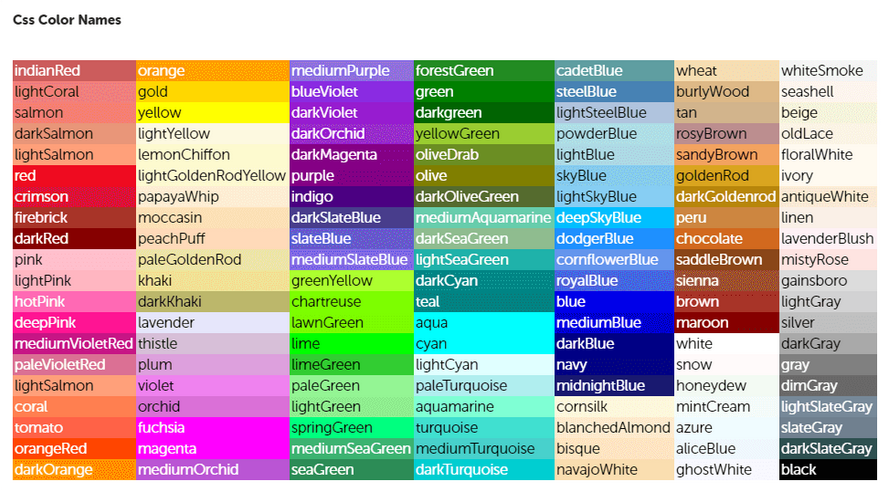
Fig. 13.1.4.1 140 of 160 CSS Color Names
13.2. Substitutions
reStructuredText supports “substitutions” (ref), which are pieces of text and/or markup referred to in the text by |name|. They are defined like footnotes with explicit markup blocks, like this:
.. |unique_name| replace:: replacement *text*
or this:
.. |caution| image:: warning.png
         :alt: Warning!
or this:
.. |aacute| unicode:: U+000E1 .. LATIN SMALL LETTER A WITH ACUTE ACCENT MARK
    :trim:     <-- optional, causes whitespace on either side to be closed.
                   This       :  Lorem ipsum [aacute] dolor sit amet
                   Rather than:  Lorem ipsum\ [aacute]\ dolor sit amet
See reStructuredText reference on substitutions for details.
If you want to use some substitutions for all documents, put them into rst_prolog or
rst_epilog (a Sphinx variable in the doc project’s conf.py file) or put them
into a separate file and include it into all documents you want to use them in, using
the .. include:: directive. (Be sure to give the include file a file name
extension differing from that of other source files, to avoid Sphinx finding it as a
standalone document.)
Sphinx defines some default substitutions.
13.3. Unicode Substitutions
The DocUtils Python Package ships with a series of include files (.txt) that
contain a variety of Unicode substitution definitions that can be conveniently
included in a reST document. These .txt files are found in the Python Package
subdirectory:
parsers/rst/include/
but you don’t need to worry about where they are because there is a special syntax
that can be used with the .. include:: directive like this:
.. include:: <isoamsa.txt>

.. or

|larr|  unicode:: U+02190 .. LEFTWARDS ARROW

…

parent |larr| child
results in:
parent ← child
Be advised that among those .txt files, there is some symbol overlap because
some symbols belong to more than one symbol group.
Todo
Unicode Substitutions page
See https://trello.com/c/DJlEcxpM/300-create-a-page-that-shows-all-the-docutils-rest-substitutions for a little authoring project that needs to be done with a Python script to build page(s) containing all the Unicode substitutions provided in the Docutils Python package. These are contained in the Docutils Python package under the
parsers/rst/include/
subdirectory. A Python script should be able to read them all and generate reST file(s) that contain the substitutions, and the syntax of how to embed them in .rst files.