2.5.3. Tactics
2.5.3.1. Definition of Tactics
The term “tactics” is derived from the Greek words
taktikós, adj. “of ordering or arranging, of ordering troops in combat,”
taktós, “ordered, prescribed” (verbal adjective of tássein—Attic táttein—“to draw up in order [as troops, ships], post, station, place in order, prescribe, assess,” of uncertain origin)
+ -ikos, “having the character or form of; being”.
Tactics are the science and art of disposing and maneuvering forces in combat, or (more applicable to our topic) the art or skill of employing available means to accomplish an end.
2.5.3.2. Tactics to Produce that Documentation
The sequence of producing good documentation almost never follows the sequence of a reader reading it. In fact I think I can confidently say that it never follows that sequence. The reason for this is that typically, the writer’s thought sequence starts with the general and then dives into deep detail, cyclically, over and over again until the documentation material is a complete and valuable, final product.
How does the writer restrain himself from ending up with the thought sequences as they came out of his head?
2.5.3.2.1. Create a Plan
To have such a thought sequence, but still wind up with well-organized, high-quality documentation (that has the qualities described in the Qualities of Good Documentation section), one needs a detailed plan, ideally very early on in writing that documentation: an outline or definition of the navigation tree (table of contents) should be fleshed out and made fairly firm before much writing has taken place. (Note that the term “navigation tree” applies whether the end documentation will be in electronic or printed form, since chapter and section titles are most definitely part of what the user searches to most quickly find answers to questions.)
Without such a plan, the quality of the whole drops as the material “evolves over time” and an in-sequence reading begins to have problems, such as logic gaps, and material about a particular topic can (and does) become scattered. This can be the case for collaborative (e.g. GitHub) projects when lack of such a plan was not made known early to all the writers involved. The result of this is that the content begins to deviate more and more from the ideal scene described in the Qualities of Good Documentation section earlier. Content is duplicated in multiple places, and the organization (and therefore usability) of the whole document gradually goes downhill until some organizing force intervenes. One of the factors that causes this to occur is that without such a plan, the writer follows his cyclic train of thought across a span of days, weeks, months or even years (several of the volumes of The Art of Computer Programming, by Donald Knuth took years to complete), instead of following the reader’s needs (an organized easy-to-read, easy-to-use, cohesive whole).
When such a plan has not existed for a long time, the documentation builds more and more content that gains inertia, and thus becomes more and more costly (in terms of time and effort) to fix.
2.5.3.2.2. Work From that Plan
Having a “navigation tree” (or table of contents) plan helps to enforce that both the orientation material and the details both end up in the right places: when the writer is in the orientation material and his train of thought dives into details, he can quickly realize he is writing details that don’t belong in orientation material and move them to the Reference Section where they belong, to the one detail section covering that topic, in a way so as to make that detail dovetail nicely with the rest of the Reference material. And vice versa when his train of thought goes the other way—from detail to basics.
2.5.3.2.3. Use Only Terms the Reader Knows or Can Easily Look Up
The writer should never use terms that the reader cannot easily look up, given the resources currently available to him. Use of slang or local colloquial terms or phrases (both British and Americans have such terms and phrases) will defeat your purpose.
2.5.3.2.4. Ensure the Reference Section is Complete First
The Reference Section should itself be in logical sequence: more basic concepts first with more complex concepts later that build upon the basics. Its page titles and subsections should be intuitively titled to help the reader skip over concepts which he already understands or are not relevant to his immediate questions. Burying concepts in prose and verbiage demands more time from the reader seeking answers to specific questions.
Each subtopic should have logical boundaries and the writer needs to find the discipline to stick to those boundaries, whether it is a subsystem of a larger machine or of a software library. It needs to be thoroughly documented, so the reader can find answers to all questions he is likely to ask (based on what type of audience he is and thus his purpose for searching). Simultaneously it should only refer to (as opposed to including) details that belong in other subtopics: put a link in the subtopic to “the other detail” and keep the other detail in the topic where it belongs—where readers will look for it.
Reference sections should be comprehensive. In other words, it should be a thorough “thought download” from its designer in a logical sequence so that the reader can achieve success with that “thing”, whether he be a mere “user”, a “maintainer”, or perhaps may need very deep knowledge as an “overhauler”. (Note that I am using general terms that can apply to software or machines.)
It is a common practice to have 2 different publications: one for end users, and the other for maintainers, as is successfully done in the automotive world. If you are doing this, then be aware of when your mind goes into the level of detail that most end users will not need, that such material should be moved to the publication (document) for maintainers.
As the writer’s thoughts cycle back to the general (introductory, orientation material) from the detailed, record that material in places where the orientation material will be.
Create chapter and section titles that are intuitive so that the material is skimmable. This helps the reader skip over concepts which he already understands or that are not relevant to his immediate question(s).
Be brief. Burying concepts in prose and verbiage demands more time from readers seeking answers to specific questions. Save your reader’s time by writing like a newspaper instead of a novel. Specifically:
Headings—should be descriptive and concise.
Hyperlinks—should surround words that describe the link itself (and never phrases like “click here” or “this page”).
Paragraphs and list items—should begin with identifiable concepts as early as possible, i.e. in the first 1-3 words.
Include examples when they will empower the reader. Many readers look first to examples for quick answers, so including them will help save these people time. Try to write examples for the most common use cases, but not for everything. Too many examples can make the documentation less skimmable. Also, consider separating examples and tutorials from more dense reference information to further help readers skim.
Be consistent in language and formatting: the more editors you have, the more important a style guide becomes in facilitating consistency. Consistency also helps make documentation skimmable and beautiful.
Remember: follow the navigation tree plan.
2.5.3.2.5. Write the Orientation Material
Once the Reference Section is written and well organized (and fairly stable so you can supply links to it that are not likely to be broken before your writing is complete), now is the time to write the orientation material.
Try to see it from the view of a reader new to your product: he needs a bridge from knowing nothing about your product to being ready to tackle the reference section. If you are not already good at it, you will need to become good at looking at the topics you are writing about from the new reader’s point of view: as if you know nothing about them. When you are successful at doing this, it will be clear how to guide your reader through each new understanding, building on what he already knows.
Make a list of prerequisite understandings he will need when he is a beginner. Use it as a checklist, and make sure the path to each understanding is covered in a gradient sequence so complex understandings build upon more basic ones.
Start with orientation about your product as a whole. Answer The Basic Questions very early in your material to orient the reader, while providing links to more detailed information when appropriate.
“The basics” of a thing will, by necessity, be at the beginning of the Reference Section for that thing. A little repetition is okay, but a lot is a sign of needing to move detail to its one place in the Reference Section and provide a link to it instead of repeating it.
Remember: the final result of the introductory material is that it provides a bridge from knowing nothing about your product to being ready to take on the Reference Section and from then on, use it as his “go to” for getting questions answered. You are “holding the reader’s hand” to guide him through A) acquiring prerequisite understandings while B) discovering where to find more detail when he is ready for it.
2.5.3.3. When to Move Subtopics to Separate HTML Pages
(And When Not To)
Some people argue that excessively long HTML pages in documentation can make topics the reader is looking for harder to find. But to be clear, two qualities reduce this problem considerably:
clear section headings and sub-headings, presented in a logical sequence,
logical grouping of content by using sub-headings, and
easily-accessible tables of contents.
Long pages sometimes have tables of contents immediately under the first 1 or 2 orientation paragraphs, to allow an advanced reader to easily jump to the sub-topic he is asking questions about.
Further, documentation generators nowadays, especially in the HTML output format, often can generate tables of contents panels on the left (typically for the whole complex documentation tree) and sometimes even on the right (for the current document) that cause longer documentation HTML pages to be exceedingly skimmable.
In these contexts, long (yet skimmable) pages are genuinely not a problem, so long as all the sub-topics covered on that page are indeed pertinent to the page’s main title, and are presented in a logical sequence. Both of these qualities are important to make topics findable.
However, there is a particular situation when isolating a certain set of sub-topics into their own HTML pages can offer a welcome speed-up to navigating and consuming that material. That situation is when the reader will, in most cases, only need a subset of those sub-topics. Example: the reader is going to be writing firmware for hardware that only has a touch screen for user input. That hardware doesn’t have a mouse, keyboard, touchpad, buttons, or an encoder (infinitely-rotatable knob) for user input. In this case, the reader simply does not need the details on how to get input from those other types of input devices to successfully write the input handling logic for that firmware.
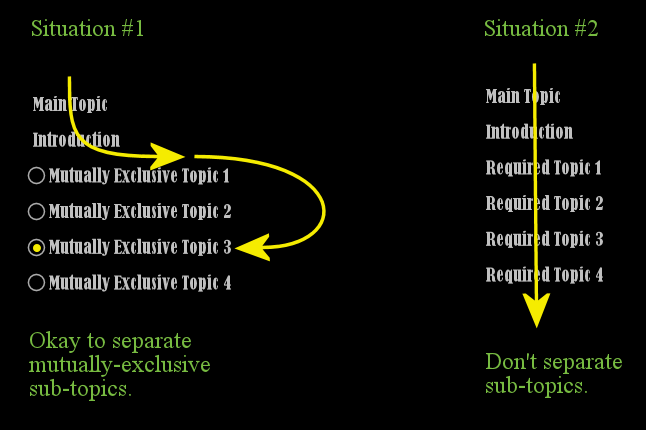
Fig. 2.5.3.1 When to Separate HTML Pages
2.5.3.3.1. When Moving Subtopics into Separate HTML Pages Can Be a Problem
Here and there in the industry this author has come across documentation that seems to have been overly motivated by having small HTML pages. A problem can come from this when the overall topic (i.e. from the parent page) cannot be correctly used unless the reader also has understandings from several other pages. When this is the case, that documentation has been the victim of “misguided HTML-page-size motivation”. If the “leaf” pages are not whole topics in themselves, then this type of page organization will hinder a reader new to the topic rather than help him.
Here is why:
When a main topic of an HTML page is complex enough that it requires a set of several understandings (plural) to be correctly used, this is normally handled by having that set of sub-topics appear on the same page, separated by subsection headings (comparable to having them in the same chapter in a book). The fact that they are indeed on the same page (or chapter) as the other sub-topics correctly shows that each sub-topic is:
directly related to the main topic, yet
only provides a partial understanding of the whole, and
simultaneously indicates the other sub-topics are also important for correct usage of the topic covered by the title.
In this case, separating those sub-topics onto separate HTML pages reduces visibility of this relationship, and therewith makes that documentation less usable because it is less coherent. In short, it causes “tunnel vision” in the documentation, causing the proverbial “out of sight, out of mind” phenomenon.
Thus, when considering whether a long HTML page is, in fact, a problem, be careful about separating its parts into separate HTML pages merely for the sake of reducing page size. Instead, consider, whether the sub-topics under consideration for separation are really whole topics of their own—in relation to the overall topic being documented. If not, then in fact it belongs with the overall topic and should be positioned that way for sake of coherency.
2.5.3.3.2. Additional References Favoring Longer Pages with Subsection Structure
2.5.3.3.3. Arguments in Favor of Shorter Pages
Despite the above leanings towards favoring longer pages with subsection structure over shorter pages where each page covers just one topic (with, at most, a small number of subsections), there are actually two circumstances which favor shorter pages.
Interestingly, I have not found support for this anywhere else. The below is based on my own research, reading experience, expertise in the topic of learning itself, combined with actual empirical findings with readers whose primary language is not the one they are reading. The below, so far, are the only good arguments in favor of shorter pages that I have encountered to date. But they are definitely real and worth considering carefully.
2.5.3.3.3.1. When its Most Important Audience is Foreign Readers
When you are writing for an audience whose primary language is not the one you are writing in, this author has encountered some unexpected, but real, factors involved. After closely surveying a few of them, and consulting some deep details related to the topic of learning itself, I have realized that readers who are reading in a language that they are not fully literate in, in an unexpectedly-high percentage of cases, quite literally face mental discomfort when facing a long page.
This mental discomfort causes these readers to favor shorter pages with tables of contents that force them to read only the sub-heading titles (which become the sub-page titles in the TOC) at the cost of:
separating out necessary-to-learn subtopics onto separate pages;
requiring additional clicks to read it all in sequence (when reading it all is necessary);
causing “tunnel vision” or “out of sight, out of mind” phenomenon in the documentation (discussed above, making it more possible for new readers to miss pertinent subtopics they need to learn);
losing the advantages of being able to use
Ctrl-Fto find specific things on a longer page encapsulating the whole topic; and finallymaking it harder to read and/or review a set of related topics (on separate pages) in sequence from the text editor used to edit the content.
This particular audience finds it easier to navigate and use content when the pages are shorter, and the text gets straight to the point.
2.5.3.3.3.2. When It Is More Frequently Used as a Reference (vs a One-Time Sequential Read-Through)
The second good argument for making smaller pages when that material is more often used as a reference than it is for reading it sequentially straight through.
We assume, regardless of the nature or complexity of the topic, most first-time readers are going to read the content in sequence, except in the case cited above where he only needs a subset of a set of sub-topics.
However, when documentation is more often being used as a reference (e.g. to look something up quickly in order to complete a task at hand), the reader is looking for specific content as a reminder of certain details (e.g. programming-language syntax, or a known-working example of source code). This is another case where small pages can make that look-up task more efficient. This is especially true when the page is found via a web search or keyword search.
A great example is my own use of this reStructuredText reference or this reference, in which I prefer to look at the example to remember how to code footnotes in reStructuredText, as opposed to attempting to reread the prose in the Docutils Footnotes Documentation, which takes many times longer to interpret. To make matters worse, using the latter is more prone to misinterpretation and subsequent trial and error with getting footnotes to work correctly in documentation.
The result of using the “quick reference” with examples: it took only 30 seconds to produce a finished, working footnote vs 2-4 minutes of reading and potential trial and error, recompiling the docs (possibly several times) to test and confirm it is working correctly. Indeed I used the above “quick references” to code the footnote below[1] and link it to the paragraph below. And there is no arguing with the fact that this approach was at least 4X more efficient.
2.5.3.3.3.3. Examples in the Industry
It appears both of these factors (mental discomfort, and efficiency with time) are
probably the major reasons behind the tldr[1] Linux utility (which is also now
available on many different platforms, including online), which is
a man competitor, presenting only the most important man content with a
greatly-reduced footprint (less to read), getting straight to the point of the most
common ways to use a Linux command-line utility (as well as other topics), leveraging
tables, lists, and examples over prose description. Interestingly, it turns out to
be a HUGE time-saving utility when one is faced with having to learn a new
command-line utility, but doesn’t want to spend more than 10-30 seconds to learn the
minimal amount to just get past the next step in his current task. While this is
exceedingly useful for non-English-speaking users, it also turns out to be
exceedingly useful for native English speakers! The urge stems from the desire
to not learn the whole thing, but just enough to complete the next sub-task and be
done with it. And this is very understandable in some circumstances
i.e. when understanding the whole thing isn’t important. In short, tldr
presents the “quick-reference” or “cheat sheet” version, whereas man presents the
whole User’s Manual for each command-line utility or other system topic.
See also